How it works
This page explains the words the rest of the documentation uses. You do not need it to follow the tutorial, but it helps when you want to understand why something works the way it does, or when you build something the tutorial does not cover.
The life of one upload
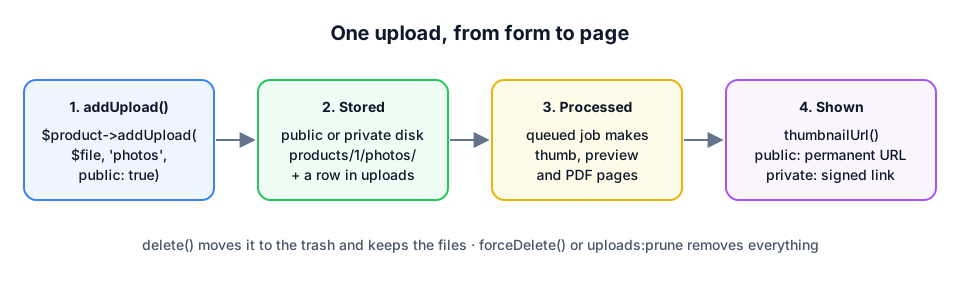
When your code calls $product->addUpload($file, 'photos', public: true), this happens:
- The file is stored. It goes to the public or the private disk (see below), in the folder
products/<id of the product>/photos/, under a new random name such as7131d4ec-….jpg. The original name is kept, but not as the file name, so two files calledphoto.jpgnever overwrite each other. - A row is written. The
uploadstable gets one row with everything about the file: where it is, its original name, its size and type, who uploaded it, which model and collection it belongs to, and your extra data. - A job is queued. A job is a piece of work that runs after the request. This one,
ProcessUpload, makes the smaller versions of an image (the conversions) and an image of every page of a PDF, and stores them next to the original. - Your page shows it. You ask the upload for an address,
url(),thumbnailUrl()ordownloadUrl(), and put that in your HTML. - It is deleted.
delete()moves the upload to the trash and keeps the files, so it can be restored.forceDelete(), or emptying the trash, removes the row and every file.
The rest of this page explains each of those words.
The upload
Every file is one row in the uploads table, and in PHP one Darvis\Uploads\Models\Upload object. That object is what you work with: it knows its own addresses (url(), thumbnailUrl()), its size (humanSize()), its type (isImage(), isPdf()) and your extra data (meta('caption')). Every column is listed in The Upload model.
The owner
Most files belong to something: the photos of a product, the attachments of a ticket, the avatar of a user. That something is the owner of the upload, and it can be any model in your application. The uploads table remembers it in two columns, uploadable_type (which kind of model, for example App\Models\Product) and uploadable_id (which one). Laravel calls this a polymorphic relation; you only need to know that one table serves every model.
A model becomes an owner when it uses the HasUploads trait. A trait is a set of methods you add to a class with one use line:
class Product extends Model
{
    use HasUploads;
}
The collection
A collection is a name you choose to keep the files of one owner apart: photos, manuals, invoices. It is just text in the collection column; there is nothing to register. When you leave it out, the collection is files.
$product->addUpload($file, 'manuals');
$product->uploadsIn('manuals')->get();    // only the manuals
$product->firstUpload('photos');           // the first photo, for example as the cover
uploadsIn() gives you a query, not the files themselves yet: add ->get() to fetch them, or ->first() for one. You can narrow it down further before you fetch, for example ->take(3)->get() for the first three. A foreach straight over uploadsIn('photos'), without ->get(), loops over nothing.
Disks: public and private
Laravel stores files on disks. A disk is a place with a name, set up in config/filesystems.php: a folder on your server, or a bucket on Amazon S3. Your code only uses the name, so moving to S3 later is a change in the configuration, not in your code.
The package uses two disks:
| Public | Private | |
|---|---|---|
| Default disk | public | local |
| Folder in a new Laravel app | storage/app/public | storage/app/private |
| Who can open it | everyone with the address | only through a signed link, after the policy said yes |
| Address | permanent, for example /storage/products/1/photos/….jpg | temporary, for example /uploads/12?expires=…&signature=… |
| For | product photos, a logo, images on public pages | invoices, contracts, print files, anything personal |
You choose per upload with public: true or public: false. Without it, an upload is private, so a file is never public by accident.
The public folder is only reachable from the browser after php artisan storage:link, which creates the link public/storage to storage/app/public. The private folder is never linked.
Conversions
A photo from a phone is easily 5 MB and 4000 pixels wide: far too big for a list of thumbnails. So the package makes smaller copies, the conversions, once, right after the upload. Two are configured by default:
| Name | Size | Fit |
|---|---|---|
thumb | 300 × 300 | cover: cropped to fill the square |
preview | 1200 wide | contain: scaled down, nothing cut off |
Both are stored as WebP next to the original, as <name>-thumb.webp and <name>-preview.webp. Ask for them with thumbnailUrl() and conversionUrl('preview'). As long as a conversion does not exist yet, those methods return the address of the original, so a page never shows a broken image.
A PDF gets an image of every page, and the conversions are made from its first page, so a PDF has a thumbnail too. Add your own sizes in config/uploads.php, see Conversions & PDF pages.
The queue
Making conversions of a large photo, or rendering a 40 page PDF, takes seconds. A visitor should not wait for that, so the package does it in a job on the queue: the request stores the file, puts a note “process upload 12” in the queue and answers right away. A separate process, the worker (php artisan queue:work), picks up the note and does the work.
Two settings decide where the note goes:
UPLOADS_QUEUE_CONNECTION=syncin.env: there is no note, the work is done right away during the request. Easy while you develop or test, slow for big files.- No setting: the job goes to the queue of your application (
QUEUE_CONNECTION, in a new Laravel applicationdatabase). A worker has to run, on your computer in a second terminal and on your server all the time.
When thumbnails never appear, the first thing to check is whether a worker runs, see Troubleshooting.
Signed links and the policy
A private file cannot be opened through a plain address, because there is none. url() on a private upload returns a signed link to the route of the package:
https://example.com/uploads/12?expires=1767225600&signature=5f1c…
The signature is a fingerprint of the address, made with your application’s secret key (APP_KEY). Change the 12 into 13, or the expiry time, and the fingerprint no longer matches, so Laravel refuses the link. After 30 minutes (link_expires_after_minutes) the link stops working.
A valid link is not enough, though. The route also asks the policy, UploadPolicy, whether the person who clicks may see the file. By default that is the person who uploaded it, the user who owns the model (a user_id column on the product, for example) and an administrator (an is_admin column on the user). A visitor who is not logged in is always refused. You can replace the policy with your own rules, see Private files.
The trash
$upload->delete() does not delete anything yet. It fills the deleted_at column, which makes the upload disappear from uploadsIn() and from your pages, but the files stay. That is a soft delete: $upload->restore() brings it back.
$upload->forceDelete() removes the row and every file, conversions and pages included. The command php artisan uploads:prune does that for everything that has been in the trash longer than 30 days (prune_after_days); schedule it once a day, see Administration & trash.
Where to go next
- Tutorial: your first upload if you have not built the photo page yet.
- The Upload model for every column and method.
- Installation & configuration for every setting in
config/uploads.php.